Internal:PODM 3D: Difference between revisions
Jump to navigation
Jump to search
Spyridon97 (talk | contribs) |
Spyridon97 (talk | contribs) |
||
| Line 83: | Line 83: | ||
# Control min edge and max edge using a percentage of the diagonal ✔ | # Control min edge and max edge using a percentage of the diagonal ✔ | ||
# Remeshing by changing sizing-function's image and not Mesher input image (TODO) | # Remeshing by changing sizing-function's image and not Mesher input image (TODO) | ||
==Fall 2020== | ==Fall 2020== | ||
Revision as of 18:30, 23 July 2020
Documentation
Fall 2019
- Read PODM3D paper✔
- Read Guaranteed Quality Tetrahedral Delaunay Meshing for Medical Images paper (Sect. 9) (TODO)
- Write a proper README.md file✔
- Add the CNF Example Meshes into the Appendix of the November Report✔
- Create CNF Adaptivity Report
Spring 2020
- Create a User Manual for PODM 3D and Tessellate2D within the fields of Medical Image Computing and Computational Nuclear Femptography ✔
Execution Examples
Fall 2019
- Create meshes for the Computational Nuclear Femtography part of CRTC_I2M_Suite Documentation. CNF Example Meshes ✔
Spring 2020
- Create meshes for the Medical Image Computing part of CRTC_I2M_Suite Documentation. Medical Imaging Example Meshes ✔
Summer 2020
- Create meshes for the Bioinformatics part of CRTC_I2M_Suite Documentation. Bioinformatics Example Meshes ✔
Code
Fall 2019
- Restructure repository of PODM3D based on Software engineering standards✔
- Decouple Args from PODM✔
- Create setArguments function✔
- Create setInputImage(ImageType::Pointer)✔
- Remove IOs from PODM✔
- Implement a sizing function that will work as an extra rule and it will use the point indices of the tetrahedron that is tested✔
- Create UML diagrams to understand the code and the Meshing Procedure in general✔
- Create a list of functions that need to be modified to implement the extra Rule ✔
- Modify the created list (Extra Rule sizing Function list) of functions✔
- Create the following test sizing function to understand if modifications have been done correctly✔
bool checkSizingFunction(double coordinatesOfTetrahedron**)
{
    double volume = volume(coordinatesOfTetrahedron);
    double* baryCenter = baryCenter(coordinatesOfTetrahedron)

    // if x axis <= 55 and volume of tetrahedron > 10
    if (baryCenter[0] <= 55 && volume > 10)
       return true;
    else
       return false
}
- Create the infrastructure to support Sizing Function pointer✔
- Incorporate Function Pointer to PODM by creating a setSizingFunction()✔
- Replace the test sizing function with the Adaptivity function that was created by Christos (The algorithm is described here)✔
- Understand that the current implementation supports negative weights✔
- Change the current implementation to use the minimum-maximum edge length of the element instead of its volume✔
- Identify an issue of checking sample points outside the image and solve it according to Christos's suggestions✔
- Separate the interface, the IOs and the filters from PODM✔
Spring 2020
- Create a general PODM driver✔
- Set a warning if delta > min-spacing * min-dimension-size / 5✔
- Set a default delta: ✔
- if sizing-function is off then default delta = min-spacing * min-dimension-size / 100 ✔
- if sizing-function is on then default delta = min-spacing * min-dimension-size / 20 ✔
- Remove labels array if there is only 1 label of interest ✔
- Print a warning if a label is not recovered✔
- Add Numa flag in CmakeLists.txt ✔
- Add binary file support ✔
- Improve Text output ✔
- Create label-filter to filter labels of images properly ✔
- Remove redundant volume threadhold checks that don't contribute anything to the meshing procedure ✔
Summer 2020
- Update ITK to v5.0.1 ✔
- Update VTK to v9.0.0 ✔
- Update Boost to v1.72.0 ✔
- Compute Mesh in Parallel (TODO)
- Create GetCleanMeshParallel function ✔
- Remove duplicate allocation ✔
- Speed-Up
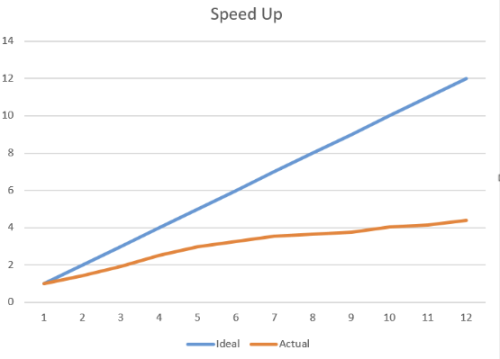
- It should be noted that the threads (7-12) are hyper threads, so they are not as powerful as the first 6.
- Test it
- Locally ✔
- On Turing (TODO)
- Save the label of a cell after its creation and Remove the expensive label recalculation in GetCleanMesh/GetCleanMeshParallel✔
- Control min edge and max edge using a percentage of the diagonal ✔
- Remeshing by changing sizing-function's image and not Mesher input image (TODO)

Fall 2020
- Produce the Voronoi Mesh out of the Delaunay (TODO)
- Check what TetGen does (TODO)
- Research conversion methods (TODO)
- Μultiple δ (TODO)
- Implement multiple δ (TODO)
- Use different δ values (possibly uniform based) according to the surface of each label of a segmented image (TODO)
- Smoothing (TODO)