Internal:PODM 3D: Difference between revisions
Jump to navigation
Jump to search
Spyridon97 (talk | contribs) No edit summary |
Spyridon97 (talk | contribs) No edit summary |
||
| Line 11: | Line 11: | ||
## Create a test sizing function to understand if modifications have been done correctly (A) | ## Create a test sizing function to understand if modifications have been done correctly (A) | ||
### I created a Cube image with Dimensions 110x110x110. I executed PODM with volume grading on. | ### I created a Cube image with Dimensions 110x110x110. I executed PODM with volume grading on. | ||
### The sizing function is <syntaxhighlight lang=" | ### The sizing function is <syntaxhighlight lang="c++" line='line'> | ||
bool checkSizingFunction(double coordinatesOfTetrahedron**) | |||
{ | |||
double volume = volume(coordinatesOfTetrahedron); | |||
double* barycenter = baryCenter(coordinatesOfTetrahedron) | |||
// if x axis << 55 and volume of tetrahedron > 10 | |||
if (barycenter[0] <=55 && volume > 10) | |||
return true; | |||
else | |||
return false | |||
} | |||
</syntaxhighlight> | </syntaxhighlight> | ||
### Result: [[File:SizingFunctionFirstVersion.png|500px|Sizing-Function-First-Version]] | ### Result: [[File:SizingFunctionFirstVersion.png|500px|Sizing-Function-First-Version]] | ||
Revision as of 16:51, 17 October 2019
- Read PODM3D paper✔
- Install all PODM3D libraries✔
- Compile PODM3D code✔
- Restructure repository of PODM3D based on Software engineering standards✔
- Execute PODM3D✔
- Read Guaranteed Quality Tetrahedral Delaunay Meshing for Medical Images paper (Sect. 9)
- Create an extra Rule which will be a user defined sizingFunction that gets a tetrahedron when all rules are met✔
- Create UML diagrams to understand the code and the Meshing Procedure in general✔
- Create a list of functions that need to be modified to implement the extra Rule ✔
- Modify the created list (Extra Rule sizing Function list) of functions✔
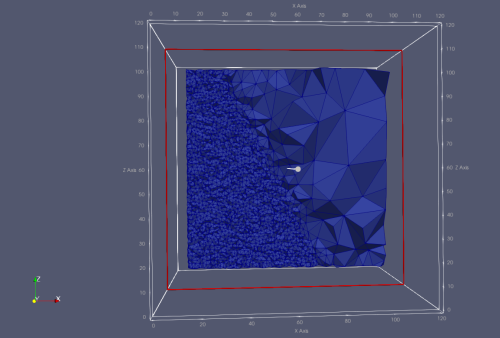
- Create a test sizing function to understand if modifications have been done correctly (A)
- I created a Cube image with Dimensions 110x110x110. I executed PODM with volume grading on.
- The sizing function is
bool checkSizingFunction(double coordinatesOfTetrahedron**)
{
    double volume = volume(coordinatesOfTetrahedron);
    double* barycenter = baryCenter(coordinatesOfTetrahedron)

    // if x axis << 55 and volume of tetrahedron > 10
    if (barycenter[0] <=55 && volume > 10)
       return true;
    else
       return false
}
- Result:
- Implement adaptivity in 3D inside sizingFunction using Christos Code (B)
- Identify places in the code where δ varies with regards to background values (C)
- Test if multiple δ work using synthetically generated image data (D)
- Need extra test cases from Gagik for Adaptivity (E)
