Internal:SlicerExtensions: Difference between revisions
| (69 intermediate revisions by the same user not shown) | |||
| Line 13: | Line 13: | ||
== APBNRR Extension == | == APBNRR Extension == | ||
Status: <span style="color:red"> | Status: <span style="color:red">TRANSITIONING LOGIC TO A LOADABLE MODULE</span> | ||
Due to the conflict of ITKDev and the ITK version of Slicer, creating a locally executable APBNRR module for Slicer is not conventionally possible. | |||
But I have figured out another way to do this. I will create a loadable C++ module for Slicer that will act as an intermediary between a portable (that statically links all dependencies) pre-compiled APBNRR executable. This will create the illusion that the user actually uses a traditional external module, which is not the case. The intermediary module will pass around data between the APBNRR executable and Slicer, and because of the deep control of a loadable module over Slicer, results can instantly be displayed. | |||
The remote execution module | The skeleton of the intermediary module can also be reused for the remote execution module to save time, modified to accommodate remote execution and communicate via SSH. | ||
=== Checklist === | === Checklist === | ||
* [ | * [<span style="color:green">DONE</span>] Create pre-compiled portable APBNRR executable. | ||
* [ | |||
* | Statically Linked: ITK, VTK 6.1.0, BOOST 1.58.0, CGAL 4.0, PDM, CBC3D, GMP, MPFR | ||
* Implement | Executable Size: 38 MB | ||
* | |||
Note: Full portability may not be possible due to some system libraries like LIBC. If there are errors, the user can compile APBNRR themselves and the intermediary module should still work using it. I later plan to utilize the SuperBuild scripts I developed for the earlier design in this portion to create an automatic build system for APBNRR. | |||
* Implement intermediary "executor" loadable module in Slicer for local execution of APBNRR | |||
** [<span style="color:blue">IN PROGRESS</span>] Transition to loadable module | |||
** [<span style="color:green">DONE</span>] Design UI | |||
** [<span style="color:green">DONE</span>] Implement UI | |||
** [<span style="color:blue">IN PROGRESS</span>] Implement logic | |||
** Test and debug | |||
* Implement intermediary "executor" loadable module in Slicer for remote execution of APBNRR and parameter optimization (reuse local module skeleton) | |||
** Design UI | |||
** Implement UI | |||
** Implement logic | |||
** Test and debug | |||
=== Scriptable to Loadable Module Transition Checklist === | |||
* [<span style="color:green">DONE</span>] Transition UI | |||
* [<span style="color:blue">IN PROGRESS</span>] Transition Logic | |||
==== Scriptable vs Loadable Module ==== | |||
'''''A scriptable module is a Slicer module that is essentially a Python script utilizing PyQt to extend Slicer's UI and functionality.''''' | |||
* A scriptable module is coded with Python | |||
* A scriptable module is simple and fast to develop and maintain | |||
* A scriptable module has control over anything that Slicer wraps with Python | |||
* A scriptable module is great for prototypes and non-computationally intensive tasks | |||
* A scriptable module usually works with many Slicer releases out of the box | |||
'''''A loadable module is a Slicer module that is a shared object library loaded by Slicer on run-time which has deep control over Slicer.''''' | |||
* A loadable module is coded with C++ | |||
* A loadable module is harder to implement and maintain | |||
* A loadable module has deep control over Slicer, including full control of the UI | |||
* A loadable module has high performance and is well suited for computationally intensive tasks | |||
* A loadable module requires recompilation with specific Slicer releases and perhaps modification to support them | |||
=== Local Intermediary Module === | |||
==== Local Intermediary Module Logic ==== | |||
* Successful initial run | |||
* Design will work | |||
===== Checklist ===== | |||
* [<span style="color:green">DONE</span>] Implement external APBNRR execution from Slicer | |||
* [<span style="color:green">DONE</span>] Test external APBNRR execution | |||
* Implement external APBNRR execution monitoring to pipe stdout to a Slicer window and detect when APBNRR has finished executing | |||
* Implement automatic APBNRR output loading when APBNRR has finished | |||
* Implement constraints to prevent multiple executions of APBNRR simultaneously, and add a way to terminate APBNRR on demand. | |||
<div><ul> | |||
<li style="display: inline-block;"> [[File:APBNRRLocalLogic1.png|thumb|none|600px|'''APBNRR Local Intermediary Module on Slicer 4.8 Successful Run''']] </li> | |||
</ul></div> | |||
==== Local Intermediary Module UI ==== | |||
* Robust input validation via regular expressions and constraints | |||
* Thread count limitation based on total threads available on running system | |||
* Automatic file extensions for file dialogs | |||
* Logical clustering of fields for easier memorization and emphasis | |||
* Supports Slicer 4.8.x and 4.9 | |||
<div><ul> | |||
<li style="display: inline-block;"> [[File:APBNRRLocalUI1.png|thumb|none|600px|'''APBNRR Local Intermediary Module UI on Slicer 4.8 (a)''']] </li> | |||
<li style="display: inline-block;"> [[File:APBNRRLocalUI2.png|thumb|none|600px|'''APBNRR Local Intermediary Module UI on Slicer 4.8 (b)''']] </li> | |||
<li style="display: inline-block;"> [[File:APBNRRLocalUI3.png|thumb|none|600px|'''APBNRR Local Intermediary Module UI on Slicer 4.8 (c)''']] </li> | |||
</ul></div> | |||
Latest revision as of 20:29, 28 August 2018
PBNRR Extension
Repository: https://github.com/aangelos28/PBNRR
Status: UPLOADED
-
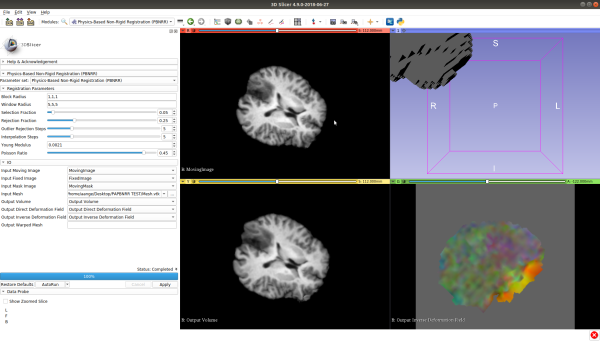
PBNRR running on the upcoming Slicer 4.9 release. -

PBNRR running on the current Slicer 4.8.1 release (compiled with Qt 5 and VTK 9).


APBNRR Extension
Status: TRANSITIONING LOGIC TO A LOADABLE MODULE
Due to the conflict of ITKDev and the ITK version of Slicer, creating a locally executable APBNRR module for Slicer is not conventionally possible.
But I have figured out another way to do this. I will create a loadable C++ module for Slicer that will act as an intermediary between a portable (that statically links all dependencies) pre-compiled APBNRR executable. This will create the illusion that the user actually uses a traditional external module, which is not the case. The intermediary module will pass around data between the APBNRR executable and Slicer, and because of the deep control of a loadable module over Slicer, results can instantly be displayed.
The skeleton of the intermediary module can also be reused for the remote execution module to save time, modified to accommodate remote execution and communicate via SSH.
Checklist
- [DONE] Create pre-compiled portable APBNRR executable.
 Statically Linked: ITK, VTK 6.1.0, BOOST 1.58.0, CGAL 4.0, PDM, CBC3D, GMP, MPFR
 Executable Size: 38 MB
Note: Full portability may not be possible due to some system libraries like LIBC. If there are errors, the user can compile APBNRR themselves and the intermediary module should still work using it. I later plan to utilize the SuperBuild scripts I developed for the earlier design in this portion to create an automatic build system for APBNRR.
- Implement intermediary "executor" loadable module in Slicer for local execution of APBNRR
- [IN PROGRESS] Transition to loadable module
- [DONE] Design UI
- [DONE] Implement UI
- [IN PROGRESS] Implement logic
- Test and debug
- Implement intermediary "executor" loadable module in Slicer for remote execution of APBNRR and parameter optimization (reuse local module skeleton)
- Design UI
- Implement UI
- Implement logic
- Test and debug
Scriptable to Loadable Module Transition Checklist
- [DONE] Transition UI
- [IN PROGRESS] Transition Logic
Scriptable vs Loadable Module
A scriptable module is a Slicer module that is essentially a Python script utilizing PyQt to extend Slicer's UI and functionality.
- A scriptable module is coded with Python
- A scriptable module is simple and fast to develop and maintain
- A scriptable module has control over anything that Slicer wraps with Python
- A scriptable module is great for prototypes and non-computationally intensive tasks
- A scriptable module usually works with many Slicer releases out of the box
A loadable module is a Slicer module that is a shared object library loaded by Slicer on run-time which has deep control over Slicer.
- A loadable module is coded with C++
- A loadable module is harder to implement and maintain
- A loadable module has deep control over Slicer, including full control of the UI
- A loadable module has high performance and is well suited for computationally intensive tasks
- A loadable module requires recompilation with specific Slicer releases and perhaps modification to support them
Local Intermediary Module
Local Intermediary Module Logic
- Successful initial run
- Design will work
Checklist
- [DONE] Implement external APBNRR execution from Slicer
- [DONE] Test external APBNRR execution
- Implement external APBNRR execution monitoring to pipe stdout to a Slicer window and detect when APBNRR has finished executing
- Implement automatic APBNRR output loading when APBNRR has finished
- Implement constraints to prevent multiple executions of APBNRR simultaneously, and add a way to terminate APBNRR on demand.
-
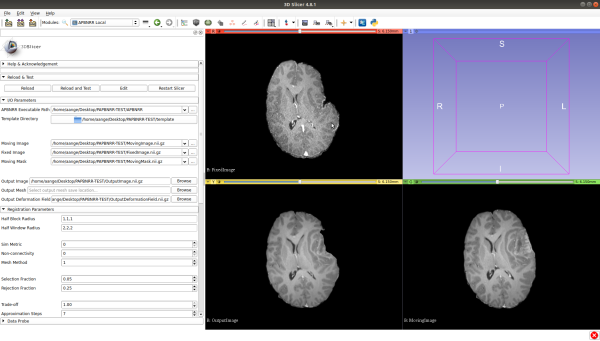
APBNRR Local Intermediary Module on Slicer 4.8 Successful Run

Local Intermediary Module UI
- Robust input validation via regular expressions and constraints
- Thread count limitation based on total threads available on running system
- Automatic file extensions for file dialogs
- Logical clustering of fields for easier memorization and emphasis
- Supports Slicer 4.8.x and 4.9
-
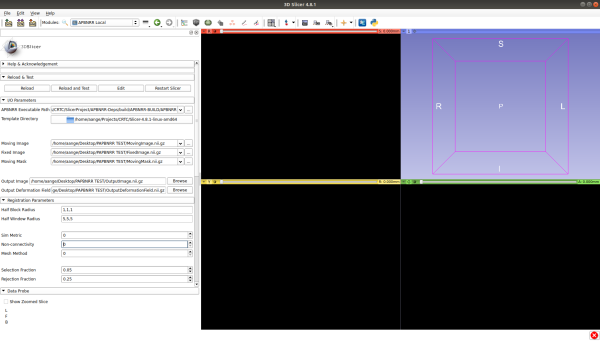
APBNRR Local Intermediary Module UI on Slicer 4.8 (a) -
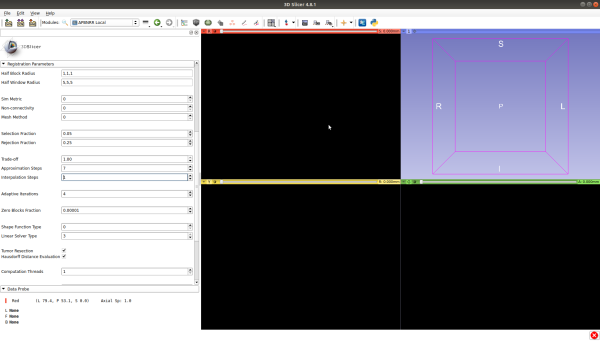
APBNRR Local Intermediary Module UI on Slicer 4.8 (b) -
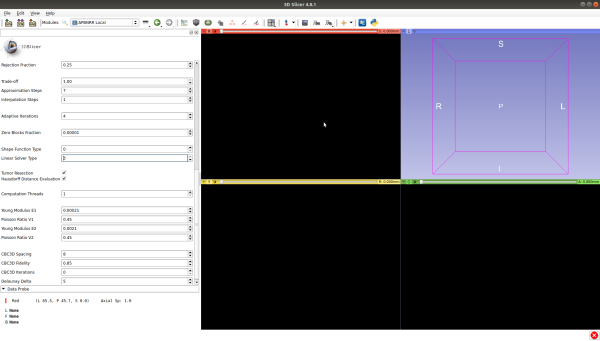
APBNRR Local Intermediary Module UI on Slicer 4.8 (c)


